
You can begin registering members from the TTR home screen but you must first establish a membership program. You do this by setting up types or levels of memberships. In the Customization Module click Membership Types, follow the instructions here:
https://www.toyourrescue.org/TTR-User-Guide/creating___managing_membership_types.htm.
Once the types are established you’ll be ready to begin registering members. You can do this from the PCO screen by selecting a PCO and clicking Membership or you can do so from the Home screen. If you click Memberships on the Home screen you will be taken to this screen.
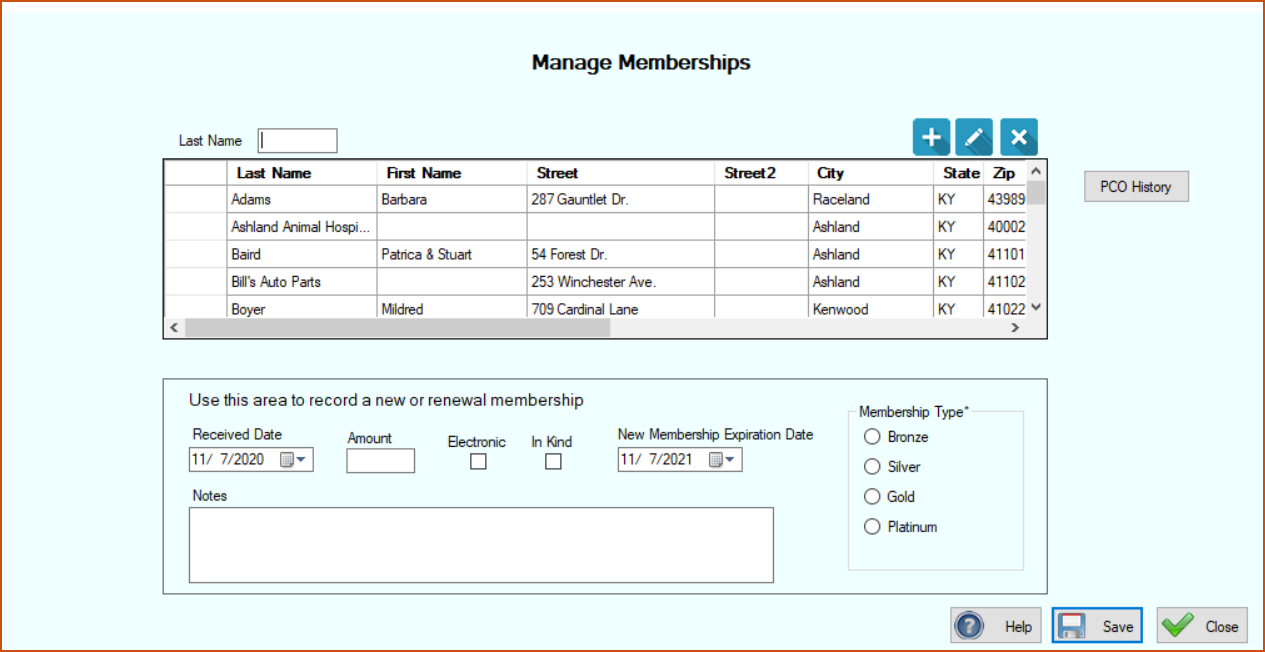
You simply select the PCO that is either renewing or becoming a new member, put in the date their membership fee was received, the amount received, click Electronic or In Kind if you desire to, select the membership expiration date, and check the membership type. Click Save.
If you later need to edit or delete the information that you entered you can go to that PCO’s history, find the membership entry and edit or delete it there.