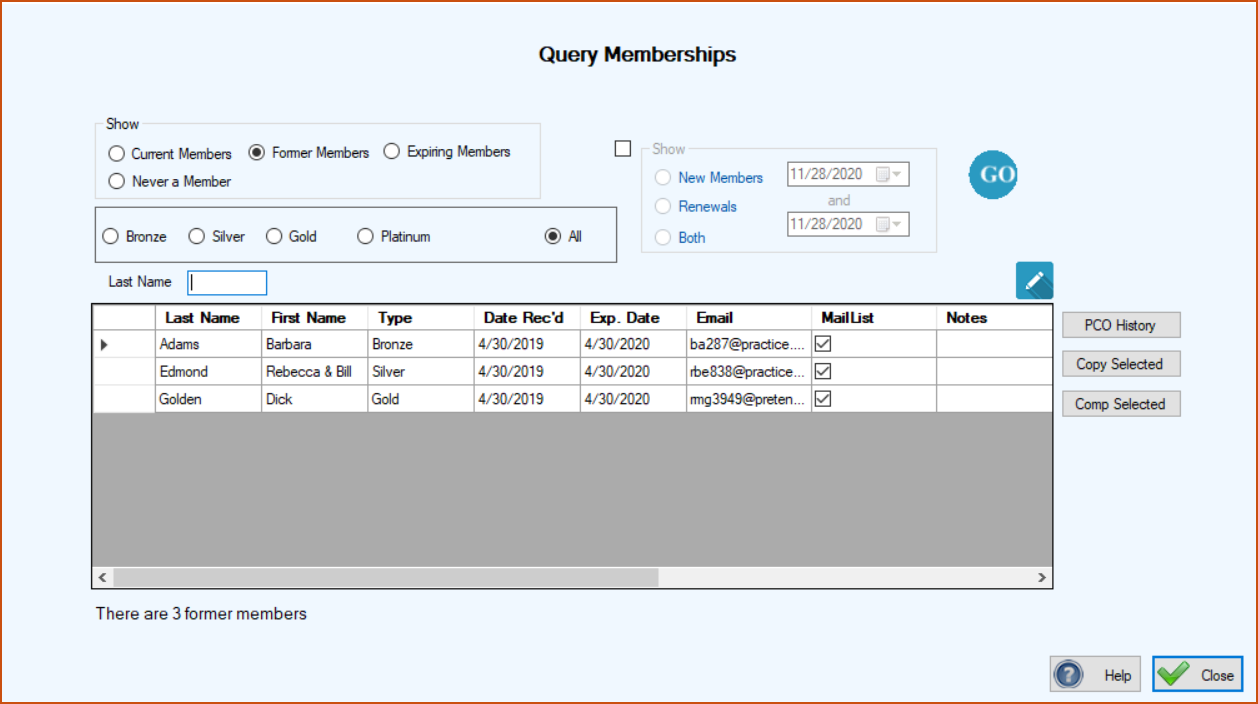
If you have a membership program, and you should, then this query will be most valuable to you. You can easily see your current members and their membership type. The image below shows members whose memberships have expired and you may want to contact them to try to get them to renew. You can see the ones that will be expiring in the next three months. You can also see the PCOs that have never been members.
If you want to see only a specific type of PCO memberships listed then you can indicate that as well.
You can view your memberships gained over a specified period of time by indicating whether you want to see new members gained, renewing members gained, or both.
Just complete the criteria you want and click the GO button.
‘Comp Selected’ on the right is if you want to give a complimentary membership to someone or some organization. Sometimes fundraising organizations will ‘comp’ the shelters that they raise funds for.
The grid can be sorted by clicking the column headers You can transfer the contents of the grid to Excel by clicking in the uppermost, left hand cell of the grid to select all of the records and then clicking Copy Selection. Then go to Excel and click Paste or ‘Crtl V’.