
This page contains instructions for the reminders you can set yourself for future Vaccinations and health Procedures and Tests for animals in your care.
Setting Reminders for Vaccinations, Procedures, Rechecks, and Updating the Vet
1. On the TTR Home screen under Modules, click Animals to open the Manage Animals screen.
2. In the center grid on the Manage Animals screen, select the animal for which you want to set a vaccination reminder by clicking the cell at the farthest left of the row containing the animal’s information.
3.Click the Vaccinations button under Animal Health on the right side of the screen.
4.In the row of blue buttons at the upper right of the grid, click the Set Reminders button ( ) to open the Set Vaccination Reminder(s) screen.
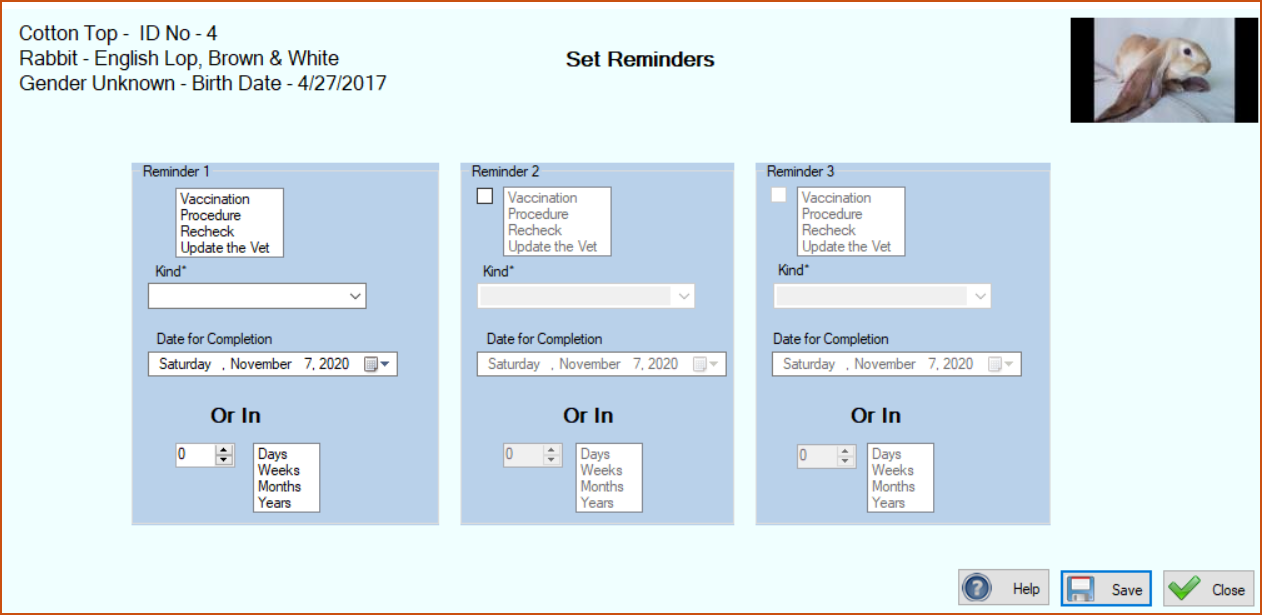
This screen allows you to establish up to three future reminders. These could be reminders for the same kind of vaccination for three different future dates, or reminders for three different kinds of vaccinations for the same or different future dates, or any combination of same and different vaccinations and dates.
5.To set Reminder 1:
(a.) Select the Kind of vaccination from the dropdown list (derived from the list you established during system setup for Creating & Managing Vaccination Types.)
If the vaccination name doesn’t appear in the list, you can type it into the field.
(b.) In the Date for Completion field, type a future day, month, and year or use the Date Picker to select a future date.
OR
In the “Or In” section:
(i.) Click the checkbox.
(ii.) Enter or select a number in the number field.
(iii.) Click on days, weeks, months, or years.
Note: These steps will set a reminder for that interval in the future, calculated from today.
6.To set Reminder 2 (optional):
(a.) Click the checkbox under the panel heading to enable the Kind field.
(b.) Perform substeps (a.) and (b.) in Step 5 above, making sure your entries are not the same as those for Reminder 1.
7.To set Reminder 3 (optional), repeat the steps described in Step 6 above.
8.Click Save
If you need to edit or delete the reminder(s) that you’ve set you can do so by selecting the animal on the Animals screen and then selecting Vaccinations or Procedures/Tests, clicking Reminders, and then selecting the reminder that you want to edit or delete.